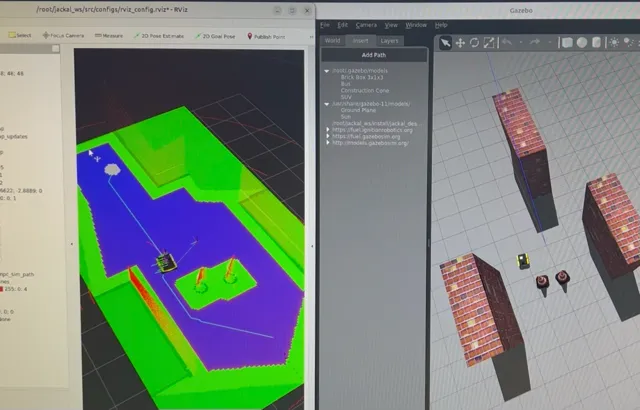
Autonomous Navigation Stack
Project Overview
As part of my work in Dr. Martin Barczyk’s Mechatronic Systems Lab, I created the Jackal Nav system for 2D path planning through obstacles with smooth navigation. I worked with a Clearpath Robotics Jackal UGV, equipped with a Velodyne VLP-16 LiDAR puck to create a decentralized point-to-point navigation system.
The stack uses Steve Macenski’s slam_toolbox package to generate an occupancy grid of the room, to which I apply various processing techniques and planning algorithms to guarantee global convergence while maintaining intuitive local behaviour.
Project aspects include:
- A multi-node package that communicates through the full ROS2 architecture of topics, services, and actions;
- A global planner that takes in an occupancy grid, processes it (e.g. uses statistical estimates to fill in unknown areas of the map), and then finds a grid traversal from start to finish that optimizes values across multiple cost maps;
- A local planner that follows the global path using Model Predictive Control (MPC) to find a smooth series of controls;
- A Mission Control node that provides high-level guidance to operate the stack.
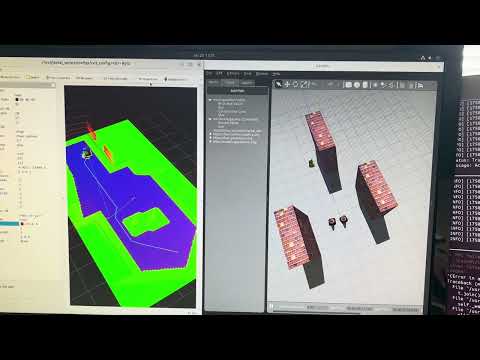
Click the panels for two other demos!
| Obstacle avoidance simulation test | Jackal hardware test rev. 1 |
|---|---|
 |  |
Design Process
My motivation for this project was that, in testing, I found the nav2 package for path planning to be disjointed by jerky motion, unintuitive paths, and frequent errors that caused the robot to stop for seconds at a time. I wanted to have something customized to the Jackal’s setup for better results. Plus creating the package was a great learning experience - I learned about actions/services, threading, MPC, and neural networks (which didn’t make the cut).
Before even starting the stack, my work with the Jackal UGV encompassed upgrading the robot as well as developing the navigation demo. First, I had to upgrade and reconfigure the Jackal’s system for ROS2. I reflashed a Jetson Xavier and rebuilt the Clearpath Robotics driver stack from ROS Noetic into ROS2 Foxy. I then had to reintegrate sensors like the Velodyne VLP 16 LiDAR into the robot’s URDF and simulated environment. I also built a Docker Compose environment to facilitate development in a dependency-isolated environment, among other things.
I began the design of the ROS 2 system by outlining my node structure and creating a system planner:
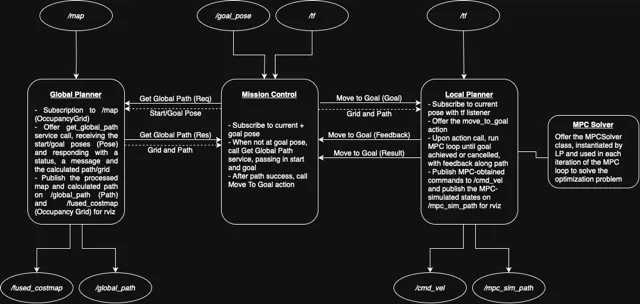
I am quite proud of the algorithmic design that went into the stack.
Technical Details
jackal_nav is a ROS2 package designed for SLAM-created map-based navigation with smooth, efficient trajectories and obstacle avoidance. The system is composed of three core nodes:
- Mission Control (MC): Oversees navigation execution.
- Global Planner (GP): Performs costmap + Dijkstra’s-based path planning.
- Local Planner (LP): Executes low-level control using MPC.
Breakdown of the Navigation Stack
Phase 1: Mission Control Node
- Subscribes to
/goal_pose - Uses a
TransformListenerto get the current pose - Calls the
get_global_pathservice from GP - Sends the path and map to LP via the
move_to_goalaction
Behaviour:
- Listens on
/goal_posefor a goal to be set - If a goal is received:
- Retrieves current pose via the transform listener
- Calls
get_global_pathservice with current and goal poses - Gets global path and occupancy grid in the response
- Calls the
move_to_goalaction on the LP - Logs feedback and results
Phase 2: Global Planner Node
- Subscribes to
/mapfor occupancy grid updates- Grid values:
-1= unexplored,0= free,100= occupied
- Grid values:
- Provides
get_global_pathservice- Defined in:
jackal/jackal_msgs/srv/GetGlobalPath.srv
- Defined in:
- Publishes:
/global_path: planned path/fused_costmap: costmap for RViz introspection
Behaviour:
- On map update:
- Store map in class variable
- Preprocess map:
- Flood-fill small unknown regions to smooth data
- Convert remaining unknowns to obstacles for safety
- Inflate grid for safe navigation using robot radius
- On service call:
- Compute distance transform from goal to generate distance costmap
- Compute obstacle-based transform to prioritize safe navigation
- Normalize and multiply costmaps element-wise to fuse them
- Plan lowest-cost path from start to goal
- Use cubic splines to smooth a downsampled version of the path
- Return smooth path and fused costmap in service response
Here is a visualization of the global path planning for an object that seeks to travel from the bottom left to the top right corners of the map. Demonstrated is the effect that different amounts of downsampling has on the path. Given a map with obstacles, we run Dijkstra on a costmap built from obstacle distance and goal distance (although simple obstacle-avoiding Dijkstra is shown here). We then downsample the path, meaning we omit data points while attempting to preserve the essential characteristics of the path. Finally, we smooth the path with cubic spline interpolation.
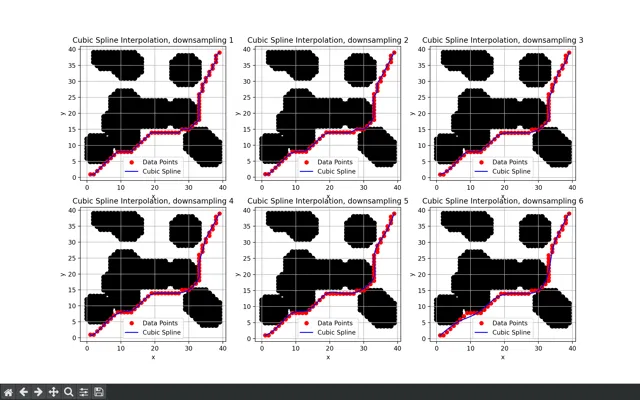
We notice there is a balance between accuracy and smoothness. Minimal downsampling retains the exact characteristics of the path at the cost of little smoothing. Too much, however, results in a path that loosely follows Dijkstra while straying near obstacles in generous loops.
Phase 3: Local Planner Node
- Offers a
move_to_goalaction server that receives goal, path, and occupancy grid - Publishes:
/cmd_vel: motor velocity commands/mpc_sim_path: simulated MPC trajectory
Behaviour:
- On action goal request:
- Turn towards initial heading
- Initialize MPC solver
- Enter control loop until goal reached or cancelled:
- Determine current pose
- Find the closest point on global path
- Select downstream point as MPC target
- Run MPC simulation
- Apply first control command to robot
Skills and Tools
I learned about:
- Sensor fusion
- Perception and data processing
- Movement algorithms
- SLAM
I used these tools:
- ROS 2
- Gazebo / Rviz
- Python
- Matplotlib